The research on why the loud task wins, the prompt that scores importance without seeing the urgency markers, and what to do about the quadrant most managers handle badly

Bottom line. Do not triage as requests arrive. Set a written standard for what counts as important, sort against it on a schedule, and answer the urgent-but-unimportant requests with a trade rather than a refusal. If you automate the sort, strip the urgency words before anything gets scored and keep urgency in its own column, scored only on deadlines with a real consequence attached.
Point an agent at your planning documents and it can draft the importance standard for you, which works better than writing one from scratch and exposes contradictions you would otherwise smooth over.
The reason to do any of this: people pick urgent work over important work even when the urgent work pays less, and five controlled experiments have now ruled out every sensible explanation for it. Willpower or good intentions are the wrong tools against a documented bias; you need a mechanism. Arrival is the moment the bias is loudest, which is why the sort has to happen somewhere else.
Where the matrix came from
On August 19, 1954, Dwight Eisenhower addressed the Second Assembly of the World Council of Churches in Evanston, Illinois. He said he had two kinds of problems, the urgent and the important, that the urgent were not important, and the important were never urgent.
He also said he was quoting someone else. Eisenhower introduced the line as the statement of a former college president and never claimed it. The college president is usually named as J. Roscoe Miller of Northwestern, though that attribution is disputed and the man may simply be lost.
Eisenhower never drew a matrix either. The four-quadrant grid taught today came from Stephen Covey’s The 7 Habits of Highly Effective People in 1989, thirty-five years later. The idea belongs to an unnamed college president, the fame to a president who was careful to credit him, and the format to Covey.
None of that makes the tool worse. It does mean the framework carries a general’s authority it never earned, which matters when someone invokes it to settle an argument.
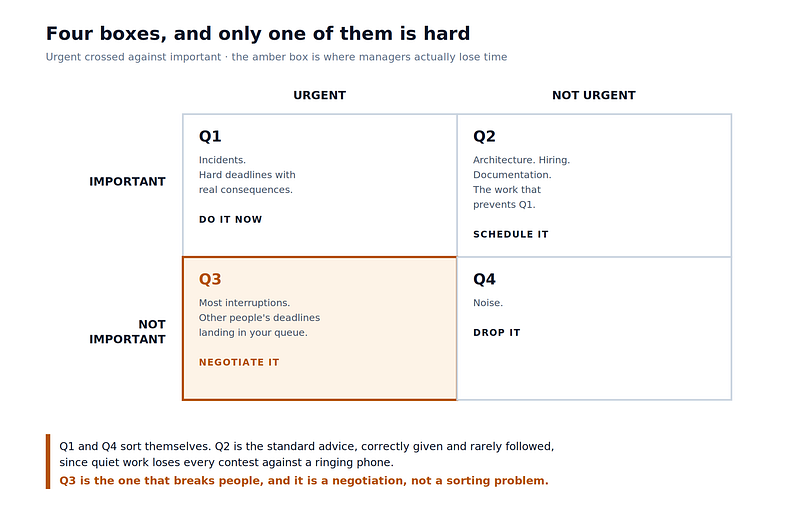
The grid itself is four boxes, formed by crossing urgent against important:
Why the loud task wins
Meng Zhu, Yang Yang, and Christopher Hsee published five experiments in the Journal of Consumer Research in 2018. They gave people a choice between two tasks, one with a short deadline and a lower payoff, and one with a longer deadline and a better payoff. People took the worse deal. They chose the task with the ticking clock even though it paid less.
The researchers then removed every sensible reason for that choice. Difficulty was controlled. Immediacy and certainty of payoff were controlled. The possibility that people meant to do the urgent thing first and circle back was controlled. Urgency still won.
They named it the mere urgency effect. The word "mere" carries the finding: urgency, with no rational claim on your attention, still pulls you away from better work. Economists call this a dominance violation: picking the plainly worse option when the plainly better one is sitting right there.
Zhu explains the mechanism this way. People get so caught up in the timeframe that they lose sight of the outcomes. A short deadline puts the clock in the foreground, and the clock crowds out the question of what the work is worth.
A manager who keeps servicing the loud request is subject to a bias that survives controlled experiments, which means the fix has to be structural rather than a matter of good intentions.
Two ways to reduce the load.
Ross Ashby showed in 1956 that anyone controlling anything can absorb only as many kinds of problems as they have kinds of responses. A manager who cannot answer every request has two moves: reduce what arrives or grow the number of things they can do about it.
Ignoring is the first move, and the cheaper one. Every filter, every routing rule, every standing answer keeps a category of requests from reaching the person who cannot handle all of them.
Any filter carries the same danger. You can genuinely reduce what needs your attention, or you can stop perceiving things and hope the discarded part does not matter. Both feel the same from the inside on a busy week.
Deciding what to ignore is the job. A filter is defensible when you can say what it discards and why.
Q3 is a negotiation
Q3 is the quadrant that breaks people. The reason is that almost nothing is inherently unimportant. Those requests are urgent and important to the person who sent them. A director asking for a slide by Thursday is working on something that matters to them, and your queue is where their solution lives.
That makes Q3 a negotiation between two people’s priorities rather than a sorting problem. File it under “not important” and move on, and you get the manager who is technically correct about prioritization and organizationally isolated.
A few things work better than a silent decline.
Name the trade. “I can get you the slide by Thursday, which pushes the capacity review to next week. Which do you want?” This converts an invisible cost into a visible choice, and it moves the decision to the person who owns both priorities.
Offer the cheaper answer. Much urgent work has a 10% option that satisfies 80% of the need. A two-line answer instead of a document. Last quarter’s numbers instead of fresh ones, labeled as such.
Route it. The request may be genuinely important and genuinely not yours. Sending it to the right owner takes two minutes and costs nothing.
Batch it. Urgency is often a property of the request’s packaging rather than its content. A daily window for this class of work removes the interruption cost while still meeting the real deadline.
Ask what happens if it slips. The answer is frequently “nothing,” and the requester often discovers this while answering. Zhu’s illusion of expiration operates on the sender too.
Where AI helps
Compression is the strongest case. A fifty-message thread into five lines, a long document into the decision it asks for, a week of alerts into the three patterns underneath them. Compression is a form of ignoring, and these systems do it reliably.
Routing is close behind. Sorting a request by topic, owner, and what kind of reply it needs has a clear right answer, and a model can do it at volume.
Drafting works well too. The two-line answer, the “here is who owns this” reply, the acknowledgment that buys a day. Much of Q3 is small, repetitive work.
And it finds the pattern you miss. Fifteen similar requests in a month is one systems problem, not fifteen interruptions. A model reading a month of your queue will find that faster than you will.
Where it does not
An agent pointed at your company’s planning documents has real access to what matters. Quarterly goals, roadmaps, team charters, customer commitments, incident write-ups, and the last two business reviews all state priorities in writing. Given those, an agent can draft the importance standard instead of waiting for you to write one, which beats writing it from scratch.
The distinction is between deriving and deciding. An agent can read what your organization has committed to and produce a defensible ranking from it. It cannot decide what the organization should value, and it cannot resolve a genuine conflict between two stated priorities. Someone ratifies the draft, and that step is not ceremonial.
Letting it draft the standard has an advantage over writing one yourself that took me a while to notice. The draft exposes contradictions. If the quarterly goals promise reliability and the roadmap is all new features, the draft puts that conflict on the page. A manager writing the standard alone smooths the two together without noticing and never sees the gap.
Worse, models inherit the urgency signal. A message marked high priority, written in short sentences, with a deadline in the subject line, looks urgent to software for the same surface reasons it looks urgent to you. Zhu and colleagues found that people respond to spurious urgency; a system trained on human-labeled priority will reproduce the same response at a higher speed. Automating triage without correcting for this scales the bias rather than removing it.
And the discarded pile is invisible. A human who ignores something usually retains a vague awareness of ignoring it. A filter that silently drops a category leaves no such trace. Anything automated at this layer needs a review of what it filtered, at some interval, or the failure mode arrives with no warning attached.
Building the sorter
A model trained on human priority labels picks up human urgency bias. A model told to ignore urgency markers does not. A person cannot choose to stop feeling the pull of a deadline. Zhu and colleagues controlled for every rational reason to prefer the urgent task, and the preference survived, which is the definition of a bias rather than a judgment. An agent has no such attachment. It has no anxiety response at 4pm on a Friday, no discomfort sitting with an unanswered message, no relief from checking something off. Those feelings are the mechanism of the bias, and the agent lacks the hardware for them.
The goal is an agent that cannot feel urgency in the first place. Four rules get you most of the way.
Score against a written standard, not a general notion of priority. The standard is the same two or three sentences from the section above. An agent given “sort by importance” will invent a definition. An agent given “importance means revenue risk, customer-facing reliability, and unblocking another team, in that order” applies yours.
Strip the urgency signal before scoring. Exclamation points, “ASAP,” red flags, the sender’s title, the word “urgent” in a subject line. These predict how a human will feel about a message and say almost nothing about what it is worth. Removing them before the importance score is the one change that keeps the sort from repeating the problem faster.
Score urgency separately from real deadlines only. A real deadline is a date with a consequence attached. “Needed by Friday because the board deck locks Friday” is a deadline. “ASAP” is a mood. Keeping the two dimensions in separate fields preserves the matrix instead of collapsing it.
Make it show its work. A sort with a one-line reason per item is auditable. A sort without one is a black box you will stop trusting the first time it drops something that mattered.
What I use
Disclosure before the recommendation: I work at Amazon. The tool I am about to describe is an Amazon product. I did not build it, and I am not paid to promote it. I am recommending it because I run it daily, and the pattern would work on a competing platform if you prefer one.
Here is the setup it replaced, which is the one a lot of managers are still running.
Deadlines lived in a calendar. Project status lived in tickets. Commitments to other teams lived in Slack threads and email. Dates lived in documents, across multiple document systems, written by different people using different conventions. Every incoming request had to be weighed against all of it, and the weighing happened in my head, from memory, in the minute between reading the message and answering it.
That does not work, and the reason is not effort. Two cyberneticians, Roger Conant and Ross Ashby, proved in 1970 that anyone controlling a system has to carry a working picture of it. A picture assembled on demand from six systems gives you fragments instead. The fragments that surface are the ones I happened to touch recently, which puts recency back in charge of the decision I was trying to protect from urgency.
Misses in that setup were a certainty with a schedule, not a risk.
What fixed it was putting everything in one searchable place, more than any clever agent on top. Once the calendar, the tickets, the threads, and the documents sit behind one search layer, the picture lives outside my memory and comes back the same way twice. The agent searches it. Without that layer there is nothing to search.
I use the Amazon Quick desktop app for this. AWS launched it as Quick Suite in October 2025 and renamed it in April 2026. The desktop client needs the Plus tier or above; the free tier runs in a browser only.
Desktop matters here for a reason beyond convenience. A browser tab is a place you go. Triage that depends on you remembering to go somewhere happens when you have a free moment, and a free moment is when the bias is loudest. An app running next to your work can sort on a schedule and hand you the result, which moves the decision off arrival and onto a cadence.
Two connections do the work, and people usually make only one. The request streams are obvious: mail, chat, tickets. The planning documents are the ones people skip, and they separate a sorter from a judge. An agent reading only your inbox sees requests. An agent reading your inbox next to the roadmap and the quarterly goals sees requests against commitments.
AWS published a use case close to this. In January 2026 a member of the Prime Video Advertising team presented a message scanner built on the same tooling, to cut time spent sifting through communications. That is a team inside a large company solving the compression problem, which is closer to how this gets built than a demo.
I run it daily, and two things have held up over months of use.
Prioritization is the part that works as advertised. Requests arrive ranked against what I actually committed to this quarter rather than against how loudly they were written, which is the entire point and the part I expected to work.
A second benefit I did not expect, and I now think it matters more. Nothing falls through the cracks. A person triaging under pressure drops things silently, and the dropping does not feel like a decision at the time. You handle the loud items, the quiet ones scroll off the screen, and three weeks later you find out a request from a partner team was never answered. An agent that ranks everything still holds everything. The low-priority items sit in a list I can scan in thirty seconds instead of a queue I stopped reading on Tuesday.
Ranking and recall are different problems. I went looking for the first and got more value from the second.
The prompt
Here is a working version, shortened:
STEP 1: Strip the urgency theater.
Restate each request in one plain sentence. While doing this,
ignore: urgent, ASAP, critical, EOD, exclamation points, all caps,
high-priority flags, repeated follow-ups, and the sender's title.
These predict how a human will feel about a message and carry
almost no information about what it is worth.
STEP 2: Score importance 1-5 against the standard below, and
only against it. Cite the criterion. If none applies, score 1 and
say so. Do not infer importance from who sent it. A CEO asking for
something on the NOT important list is still a 1.
STEP 3: Score urgency 1-5, independently, from real deadlines
only. A real deadline is a date WITH a stated consequence.
"Board deck locks Friday at noon" is real. "Needed by Friday" is a
date with no consequence, urgency 2. "ASAP" is a mood, urgency 1.
If the consequence is unstated, do not invent one.
STEP 4: Place it by the scores, not your impression. For
importance 1-3 with urgency 4-5, draft a negotiation: name the
trade, offer a cheaper answer, or route it. Never a bare refusal.
STEP 5: Output a table, then three sections: PATTERNS (any
request type appearing 3+ times), DROPPED (by title, so I can scan
for mistakes), UNCERTAIN (with the one question that would
resolve each).
<importance_standard>
Important here, in order: [revenue at risk] [customer-facing
reliability] [unblocking another team] [compliance with a clock]
NOT important, regardless of who asks: [status duplicating a
dashboard] [self-serve data requests] [meetings with no decision]
</importance_standard>
Stripping runs before scoring. Removing the urgency markers after the model has read them does nothing, since the framing has already happened.
The NOT important list matters more than the important one. Most standards only say what counts, which leaves everything unlisted as a maybe. Naming the common non-work produces a confident 1.
DROPPED is listed by title. A filter that discards silently leaves no trace, and thirty seconds scanning that list is the whole audit.
Before automating any of it, run the sort in parallel with your own for two weeks and compare the dropped lists. The disagreements show where the standard is wrong, which is information available no other way.
What to do differently
Write the importance standard before the week starts. Two or three sentences on what makes work important this quarter, specific enough that another person could sort your queue with it. Everything downstream depends on this existing in writing rather than in your head.
Sort against the standard on a schedule, not on arrival. The bias operates on arrival. A fifteen-minute sort at a fixed time each week is enough, and that sort is where the important-but-quiet items get protected.
Answer Q3 with a trade rather than a no. The trade makes the cost visible to the person who created it.
Use AI for compression, routing, and drafting, and let it draft the importance standard from your planning documents. Ratify the draft yourself. If you automate the sort, strip the urgency markers before scoring and keep urgency in its own field, scored on real deadlines only. That division holds even as the models improve. They are judging what your organization values, and that is not in the model.
And audit the filter. Once a month, look at what got dropped. The goal is to notice whether the filter is dropping a category you never meant to drop. That failure arrives with no other warning.
By Joshua McDonald on August 26, 2026.
Reader discussion