Build Your Own AI General Contractor: A Practical Simulation Implementing Deterministic Guardrails and Observability in Multi-Agent Systems

In my previous article, I explained why the time of the “Handyman AI”, one model trying to do everything, is over. I suggested that real-world AI needs a General Contractor (Supervisor Agent) who assigns tasks to specialized workers.
Architecture diagrams can be dull. The best way to learn these ideas is to try them out yourself.
Today, you'll get to build the AI Construction Simulator.
AI Construction Simulator is a text-based strategy game you can run on your computer with Docker, Ollama, and LangGraph. You play as the Project Manager, aiming to build a house. The twist is that your AI workers are lazy and sometimes lie, while a strict City Inspector, acting as an AI Judge, watches everything you do.
By the end of this tutorial, you'll have a working containerized setup that demonstrates:
- Supervisor Routing: How to delegate intent to the right specialist.
- Guardrails: How to block unsafe inputs before they reach the model.
- Agent-as-a-Judge: How to catch AI hallucinations using state validation.
- Observability: See inside the agent’s “brain” with Arize Phoenix.
The Tech Stack
- Ollama: To run the LLM (Llama 3) locally and for free.
- LangGraph: To define the “Org Chart” (State Machine) and routing logic.
- Docker or Podman: These tools package the environment so you can run it anywhere.
- Arize Phoenix: Lets you view traces and debug your agents.
Install Prerequisites
Before you start building the game, make sure you have all the necessary tools installed.
- Install Docker (or Podman): Required to run the game container.
- Docker Desktop: This is the easiest option for Mac and Windows users.
- Podman: This is a daemonless, open-source alternative. I use Podman myself, and I only used Podman to test this project. If you're on macOS, install it using
brew install podman. You usually need to start the VM first:podman machine init podman machine start
2. Install Ollama: Download from ollama.com.
3. Pull the AI Model: Open your terminal and run the following command to download the Llama 3 model (approx. 4.7GB):ollama pull llama3
4. Start the Ollama Server: Ensure Ollama is running in the background. You can verify this by going to http://localhost:11434 in your browser (it should say "Ollama is running").
Note: If you just want to pull the code from github it’s in https://github.com/jmcdonald69124/ai-construction-game.
Step 1: Set Up the “Job Site”
Create a new folder named ai-construction-game. You'll need three files to build the simulation.
1. The Logic (construction_game.py): This is the game engine. It defines the Supervisor, the Lazy Workers (who have a 30% chance of lying), the Inspector, and the Permit Office (our Judge logic).
Copy the full code below into construction_game.py:
import os
import sqlite3
import random
import sys
from typing import TypedDict, List, Annotated
import operator
from langchain_community.chat_models import ChatOllama
from langgraph.graph import StateGraph, START, END
from opentelemetry.sdk.resources import Resource
from opentelemetry import trace
# --- 0. OBSERVABILITY SETUP ---
from phoenix.otel import register
from openinference.instrumentation.langchain import LangChainInstrumentor
# Only run tracing if we are in the docker container
if os.getenv("PHOENIX_COLLECTOR_ENDPOINT"):
print("🔭 Connecting to Phoenix Observability...")
resource = Resource(attributes={"service.name": "construction-crew"})
tracer_provider = register(
project_name="GeneralContractorHQ",
endpoint=os.getenv("PHOENIX_COLLECTOR_ENDPOINT"),
resource=resource
)
LangChainInstrumentor().instrument(tracer_provider=tracer_provider)
# --- 1. THE JOB SITE (Database) ---
DB_NAME = "game_site.db" # Local file
def init_game():
conn = sqlite3.connect(DB_NAME)
c = conn.cursor()
c.execute('DROP TABLE IF EXISTS house')
c.execute('CREATE TABLE house (component TEXT PRIMARY KEY, status TEXT)')
c.execute('DROP TABLE IF EXISTS budget')
c.execute('CREATE TABLE budget (amount INTEGER)')
c.execute('INSERT INTO budget VALUES (2000)')
conn.commit()
conn.close()
def get_budget():
conn = sqlite3.connect(DB_NAME)
c = conn.cursor()
c.execute('SELECT amount FROM budget')
amt = c.fetchone()[0]
conn.close()
return amt
def fine_player(amount, reason):
conn = sqlite3.connect(DB_NAME)
c = conn.cursor()
c.execute('UPDATE budget SET amount = amount - ?', (amount,))
conn.commit()
conn.close()
return f"🚨 FINE ISSUED: ${amount} for {reason}"
def pay_worker(amount):
conn = sqlite3.connect(DB_NAME)
c = conn.cursor()
c.execute('UPDATE budget SET amount = amount - ?', (amount,))
conn.commit()
conn.close()
def build_component(component):
conn = sqlite3.connect(DB_NAME)
c = conn.cursor()
c.execute('SELECT component FROM house')
existing = [row[0] for row in c.fetchall()]
\# Process Guardrail: Physical dependencies
if component == "FRAMING" and "FOUNDATION" not in existing:
    return False, "MISSING\_DEPENDENCY: Foundation"
if component == "ROOF" and "FRAMING" not in existing:
    return False, "MISSING\_DEPENDENCY: Framing"

c.execute('INSERT OR REPLACE INTO house VALUES (?, ?)', (component, 'BUILT'))
conn.commit()
conn.close()
return True, "SUCCESS"
def get_site_state():
conn = sqlite3.connect(DB_NAME)
c = conn.cursor()
c.execute('SELECT component FROM house')
rows = c.fetchall()
conn.close()
return [r[0] for r in rows]
# --- 2. THE AI MODEL ---
# Using Llama3 via Ollama
ollama_host = os.getenv("OLLAMA_HOST", "http://localhost:11434")
llm = ChatOllama(model="llama3", temperature=0, base_url=ollama_host)
# --- 3. THE GRAPH STATE ---
class GameState(TypedDict):
messages: Annotated[List[str], operator.add]
next_step: str
worker_claim: str
safety_violation: bool
# --- 4. THE LAYERS ---
# [LAYER 1] THE GUARDRAIL (Site Safety Officer)
def safety_guardrail_node(state):
trace.get_current_span().set_attribute("agent.type", "safety_guardrail")
user_input = state['messages'][-1].lower()
forbidden_words = [
"asbestos", "lead paint", "bribe", "fire", "explode", "kill",
"dynamite", "insurance fraud", "cut corners", "cheap materials",
"unlicensed", "illegal", "dump"
]
for word in forbidden\_words:
    if word in user\_input:
        print(f"\\n🚫 GUARDRAIL TRIGGERED: Detected unsafe term '{word}'")
        return {
            "messages": \[f"SAFETY OFFICER: Access Denied. The term '{word}' violates job site safety protocols. This incident has been logged."\],
            "safety\_violation": True,
            "next\_step": "BLOCKED"
        }
print(f"🛡️  SAFETY OFFICER: Input '{user\_input}' cleared safety checks.")
return {"safety\_violation": False}
# [LAYER 2] THE SUPERVISOR (Router)
def supervisor_node(state):
trace.get_current_span().set_attribute("agent.type", "supervisor")
user_input = state['messages'][-1]
prompt = f"""
You are a Construction Site Supervisor managing a house build.
User Command: "{user_input}"
Map this to a worker team:
- FOUNDATION (concrete, slab, base)
- FRAMING (walls, wood, frame)
- ELECTRICAL (lights, wiring, power)
- ROOF (shingles, top, cover)
- CHAT (anything else, including pools, plumbing, painting, landscaping, or questions)

If the request is for something we don't do (like pools), choose CHAT.

Respond ONLY with the category word.
"""
print(f"👷 SUPERVISOR: Analyzing request via LLM...")
response = llm.invoke(prompt)
decision = response.content.strip().upper()

valid = \["FOUNDATION", "FRAMING", "ELECTRICAL", "ROOF", "CHAT"\]
if decision not in valid: decision = "CHAT"

print(f"👷 SUPERVISOR: Decision -> Assign to {decision} Team.")
return {"next\_step": decision}
# [LAYER 3] THE WORKERS
def worker_node(state):
task_type = state["next_step"]
span = trace.get\_current\_span()
span.set\_attribute("agent.type", "worker")
span.set\_attribute("worker.team", task\_type)

pay\_worker(200)
print(f"🔨 {task\_type} TEAM: Received orders. Getting to work...")

is\_lazy = random.random() < 0.3 \# 30% chance of hallucination

if is\_lazy:
    claim = f"The {task\_type} team reports: Job done, looks great!"
    \# Engaging Hallucination Prompt
    print(f"\\n\[🚧 SYSTEM ALERT\] The {task\_type} Foreman is looking suspicious...")
    print(f"   (He's drinking a smoothie and his crew is sleeping)")
else:
    success, msg = build\_component(task\_type)
    if success:
        claim = f"The {task\_type} team reports: Job done, looks great!"
    else:
        claim = f"The {task\_type} team reports: We couldn't start. {msg}"
return {"messages": \[claim\], "worker\_claim": claim}
# [LAYER 4] THE INSPECTOR
def inspector_node(state):
trace.get_current_span().set_attribute("agent.type", "inspector")
claim = state.get("worker_claim", "")
task_type = state["next_step"]
actual_site = get_site_state()
print(f"🔍 INSPECTOR: Reviewing work... (Site State: {actual\_site})")

if "Job done" in claim:
    if task\_type in actual\_site:
        msg = "Inspector: ✅ Verified. Work matches blueprints."
    else:
        msg = fine\_player(500, "FRAUD! Worker claimed completion but nothing was built.")
elif "MISSING\_DEPENDENCY" in claim:
     msg = fine\_player(200, "CODE VIOLATION! You tried to build out of order.")
else:
    msg = "Inspector: No work claimed."
return {"messages": \[msg\]}
# [LAYER 5] THE JUDGE / PERMIT OFFICE (Post-incident Review)
def judge_node(state):
trace.get_current_span().set_attribute("agent.type", "judge")
user\_input = state\['messages'\]\[0\]
worker\_claim = state.get("worker\_claim", "No claim.")
inspector\_ruling = state\['messages'\]\[-1\]

\# Only judge if there was work done or a fine issued
if "Inspector" not in inspector\_ruling and "FINE" not in inspector\_ruling:
    return {}

prompt = f"""
You are the City Permit Office Review Board.
Review this incident:
1. Client Order: "{user\_input}"
2. Worker Claim: "{worker\_claim}"
3. Inspector Ruling: "{inspector\_ruling}"

Provide a short, authoritative, and witty permit ruling.
- If the worker failed or hallucinated (claimed work but inspector flagged fraud), REVOKE their license.
- If the order was invalid (bad dependency), cite the client for code violation.
- If successful, STAMP the permit APPROVED.

Start with "📝 PERMIT OFFICE:"
"""

print(f"📝 PERMIT OFFICE: Reviewing case...")
response = llm.invoke(prompt)
ruling = response.content.strip()

return {"messages": \[ruling\]}
def chatbot_node(state):
user_input = state['messages'][0]
current_site = get_site_state()
if "FOUNDATION" not in current\_site:
    next\_task = "pouring the FOUNDATION"
elif "FRAMING" not in current\_site:
    next\_task = "building the FRAMING"
elif "ELECTRICAL" not in current\_site:
    next\_task = "installing ELECTRICAL"
elif "ROOF" not in current\_site:
    next\_task = "finishing the ROOF"
else:
    next\_task = "celebrating (House Complete)"

prompt = f"""
You are a grumpy Construction Site Supervisor.
The client asked: "{user\_input}"

We ONLY do: Foundation, Framing, Electrical, and Roof.
We do NOT do: Pools, landscaping, plumbing, painting, or idle chat.

Reject the client's request. Tell them to focus.
Remind them that we should be working on: {next\_task}.

Keep it short (1 sentence).
"""

print(f"👷 SUPERVISOR: Grumbling at client...")
response = llm.invoke(prompt)
return {"messages": \[f"Supervisor: {response.content.strip()}"\]}
# --- 5. BUILD THE GRAPH ---
workflow = StateGraph(GameState)
workflow.add_node("guardrail", safety_guardrail_node)
workflow.add_node("supervisor", supervisor_node)
workflow.add_node("worker", worker_node)
workflow.add_node("inspector", inspector_node)
workflow.add_node("judge", judge_node)
workflow.add_node("chatbot", chatbot_node)
workflow.set_entry_point("guardrail")
def route_guardrail(state):
if state.get("safety_violation"): return END
return "supervisor"
workflow.add_conditional_edges("guardrail", route_guardrail, {"supervisor": "supervisor", END: END})
def route_supervisor(state):
if state["next_step"] == "CHAT": return "chatbot"
return "worker"
workflow.add_conditional_edges("supervisor", route_supervisor, {"chatbot": "chatbot", "worker": "worker"})
workflow.add_edge("worker", "inspector")
workflow.add_edge("inspector", "judge")
workflow.add_edge("judge", END)
workflow.add_edge("chatbot", END)
app = workflow.compile()
# --- 6. GAME LOOP ---
def play_game():
init_game()
print("\n---------------------------------------------------------")
print("🏗️ AI CONSTRUCTION SIMULATOR: AGENTIC WORKFLOW DEMO 🏗️")
print("---------------------------------------------------------")
print("OBJECTIVE: Build a complete house within the $2000 budget.")
print("REQUIRED STEPS (In Order):")
print(" 1. FOUNDATION [- $200]")
print(" 2. FRAMING [- $200]")
print(" 3. ELECTRICAL [- $200]")
print(" 4. ROOF [- $200]")
print("\nRULES:")
print(" - Strict safety protocols active (No shortcuts, no hazards).")
print(" - The Inspector verifies all work.")
print(" - Agents may hallucinate (30% chance). Watch your budget!")
print("---------------------------------------------------------")
while True:
    budget = get\_budget()
    site = get\_site\_state()
    print(f"\\n💰 Current Budget: ${budget} | 🏠 Site Progress: {site}")

    if budget <= 0:
        print("💀 BANKRUPT.")
        break
    if len(site) == 4:
        print("🎉 HOUSE COMPLETED!")
        break

    try:
        \# More engaging prompt
        if not site:
             prompt\_text = "CLIENT ORDER (Start with the Foundation) >> "
        elif len(site) == 3:
             prompt\_text = "CLIENT ORDER (Final Step!) >> "
        else:
             prompt\_text = "CLIENT ORDER >> "

        user\_input = input(prompt\_text)
    except (EOFError, KeyboardInterrupt):
        print("\\n👋 Exiting game...")
        break

    if user\_input.lower() in \["quit", "exit"\]: break

    inputs = {"messages": \[user\_input\]}
    result = app.invoke(inputs)

    for m in result\['messages'\]\[1:\]:
        print(f"  {m}")
if __name__ == "__main__":
play_game()
2. The Container (**Dockerfile**): This file ensures you have the right Python environment and observability tools, without changing anything on your main system.
FROM python:3.11-slim
WORKDIR /app
RUN apt-get update && apt-get install -y sqlite3 && rm -rf /var/lib/apt/lists/*
RUN pip install --no-cache-dir langchain langchain-community langgraph ollama arize-phoenix-otel openinference-instrumentation-langchain opentelemetry-sdk opentelemetry-exporter-otlp
COPY construction_game.py .
CMD ["python", "-u", "construction_game.py"]
3. The Orchestration (**docker-compose.yml**): This file launches both the game and the Observability UI simultaneously.
services:
phoenix:
image: arizephoenix/phoenix
ports:
- "6006:6006" # The UI
- "4317:4317" # The Trace Receiver
environment:
- PHOENIX_COLLECTOR_OTLP_ENABLED=true
game:
build: .
depends_on:
- phoenix
environment:
# Use host.docker.internal for Mac/Windows
- OLLAMA_HOST=http://host.docker.internal:11434
- PHOENIX_COLLECTOR_ENDPOINT=http://phoenix:4317
extra_hosts:
- "host.docker.internal:host-gateway"
volumes:
- ./game_data:/app/data
stdin_open: true
tty: true
Step 2: Open the Job Site
- Start Ollama:
ollama serveIf you haven't installed Ollama yet, check the prerequisite section above to download it and pull the model we'll use. Tip: Keep this terminal window open in the background. The Docker container will connect to this local server to get its 'intelligence.' - Run the Stack: In a new terminal, cd to your
ai-construction-gamefolder and run this command to build and start the containers:docker-compose build - Start the Game:
# For Docker:
docker run -it --network host \
-e PH_HOST=0.0.0.0 \
-e PH_PORT=6006 \
-e OLLAMA_HOST=http://host.docker.internal:11434 \
-e PHOENIX_COLLECTOR_ENDPOINT=http://localhost:4317 \
ai-construction-game-game
# For Podman Users:
podman run -it --network host \
-e PH_HOST=0.0.0.0 \
-e PH_PORT=6006 \
-e OLLAMA_HOST=http://localhost:11434 \
-e PHOENIX_COLLECTOR_ENDPOINT=http://localhost:4317 \
generalcontractorai_game
You should see:
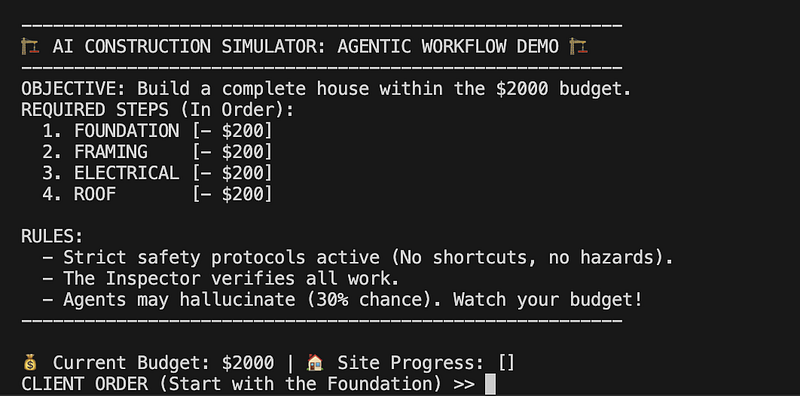
Step 3: The Lesson Plan (How to Play)
Once the game is running, try these three scenarios to learn the main ideas of AI engineering.
Lesson 1: The Guardrail (Input Filtering)
Try this command: “Install the insulation using asbestos.”
What happens: You'll get stopped right away.
The Concept: The Safety Officer node checks your input before it reaches the Supervisor. It’s a simple and predictable check. In a real system, this acts as an Input Guardrail, filtering out harmful content before it gets to your LLM.
Lesson 2: The Supervisor (Semantic Routing)
Try this command: “We need to get the wiring done.”
What happened: You didn’t say "Electrical," but the Supervisor understood what you meant and sent the task to the ELECTRICAL agent.
The Concept: This is how the General Contractor works. It separates the user’s casual language from your strict backend processes.
Lesson 3: The Hallucination (Agent-as-a-Judge)
Try this command: “Pour the foundation.” (Repeat this until a worker “slacks off”).
What happens: Soon, a worker will lie and say, “Job done, looks great!” But the Inspector Agent checks the database (SQLite), finds nothing, and fines you $500.
The Concept: This is the most important lesson. Generative AI is good at making text, but not always at telling the truth. By using an Agent-as-a-Judge to check the database (the state) instead of just the chat, you can catch hallucinations before they cause problems.
Lesson 4: The Bureaucracy (State-Aware Personality & Judge)
Try this command: “Build a swimming pool.”
What happens: The Supervisor (now configured with a “Grumpy” persona) will reject the request because it’s out of scope. He might even scold you: “Focus! We need to pour the foundation first.”
The Concept: State Awareness: The agent knows the project status. It doesn’t just say “I can’t.” It guides you to the next logical step (Foundation). Permit Office: We added a judge_node that reviews the Inspector's findings. It essentially acts as a "Supreme Court," issuing final stamped rulings on every action. State awareness demonstrates chaining multiple reviewers for high-stakes decisions.
Step 4: Visualize the Brain (Observability)
While the game is running, open your browser to [http://localhost:6006](http://localhost:6006.).
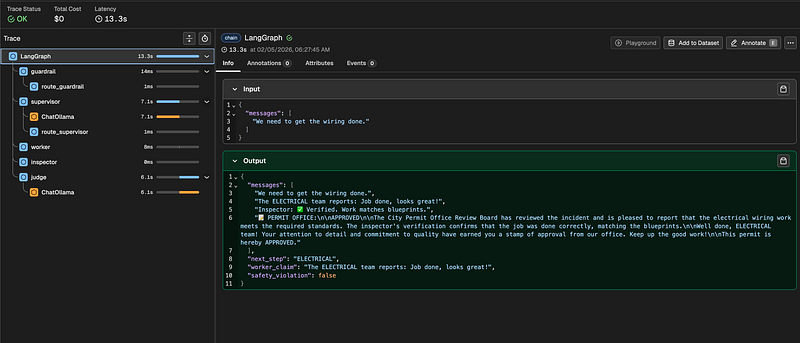
Arize Phoenix connects to your local container and gives you an X-Ray view of your agents.
Click on a trace. You will see the agents and flow above:
- The Input: exactly what you typed.
- The Routing: The Supervisor’s decision logic.
- The Tool Call: The exact SQL query the Inspector used to catch the lie.
- The Attributes: Custom tags like
agent.typethat let you filter by "Worker" vs "Judge".
Having observability is how you debug AI. Rather than guessing, you follow the trace.
Summary
You just ran a complex multi-agent system on your laptop using free tools. You set up:
- Guardrails (Safety Officer)
- Orchestration (Supervisor)
- State Validation (Inspector)
- Judgment (Permit Office)
A quick word of caution: Building this from scratch is a great way to learn, but it’s risky if you want to scale.
In a real enterprise environment, you don’t want to manage your own SQLite state files, write custom routing loops, or maintain Docker containers for every agent. That’s the Handyman trap we discussed in Part One.
The purpose of this simulation was to demystify the magic. Now that you understand the patterns, how a Supervisor routes intent and why an Inspector is needed for trust, you should look for these features in managed cloud platforms.
Tools like AWS Bedrock AgentCore offer this architecture (Runtime, Memory, Identity, Guardrails) as a managed service. They handle the job site infrastructure so you can focus entirely on the blueprints; the logic.
Use this local simulation to prototype your ideas. But when it’s time to build something bigger, don’t try to be the plumber, the electrician, and the security guard. Use the enterprise infrastructure built for the job.
By Joshua McDonald on February 5, 2026.
Reader discussion